
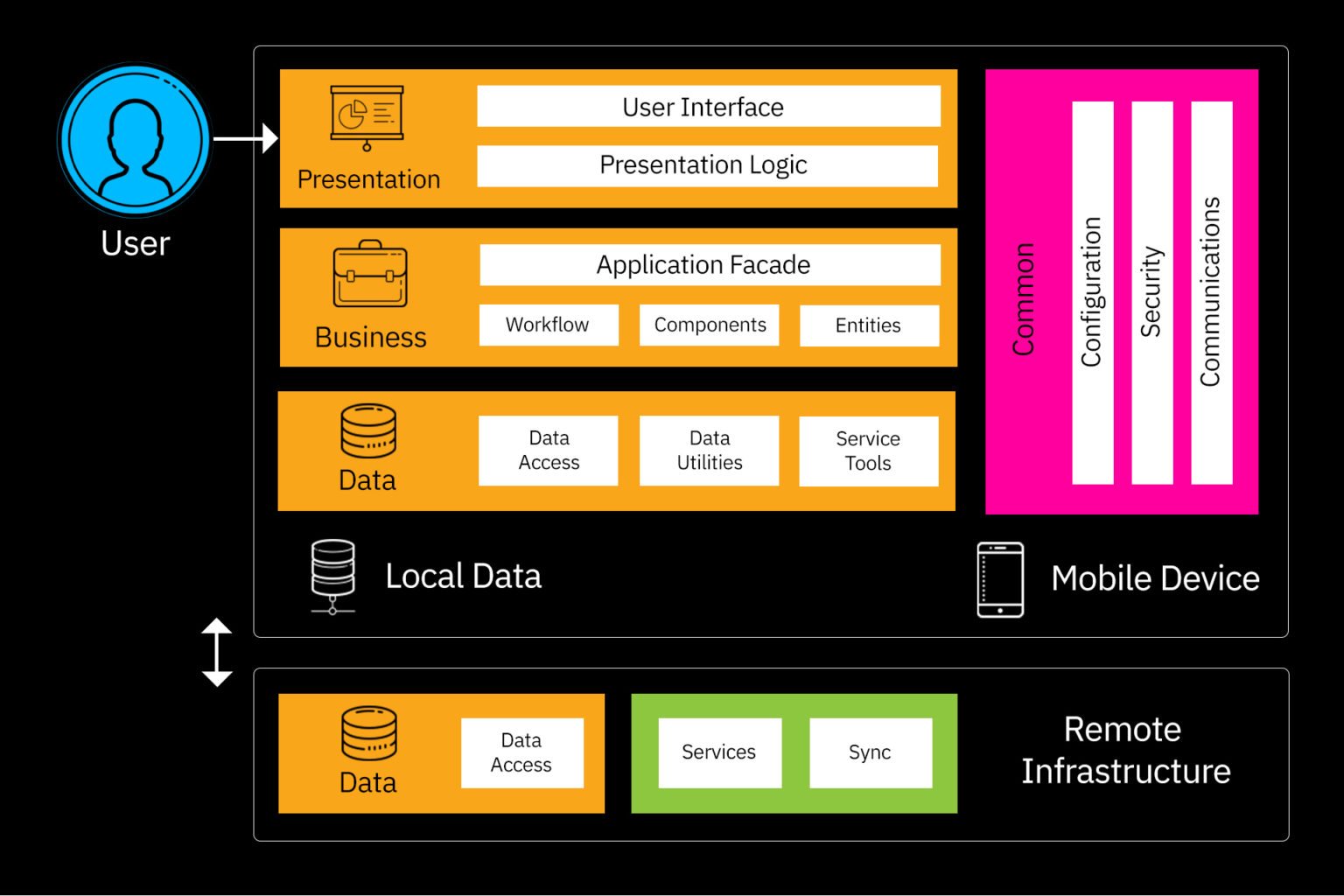
Mobile app architecture refers to the structured design that defines how different components of an application interact with each other to deliver a seamless user experience. In Android development, three of the most fundamental building blocks are Activities, Fragments, and Views. An Activity represents a single, complete screen that a user interacts with. Every time you open an app and see a page—like a login screen, settings screen, or home dashboard—you are essentially looking at an Activity. It acts as the entry point for user interaction and contains all the logic needed for that screen. A well-designed Activity ensures that the user interface is responsive, intuitive, and connected with the underlying code. Alongside Activities, Android uses Views to build the actual user interface. A View is any visual element you see on the screen: a button, a text box, an image, or even a layout acting as a container. Views make up the structure and look of the screen. They act as components that take user input, display information, and respond to touches, gestures, or clicks. Without Views, the app would have no way to visually interact with the user. Views are arranged in hierarchical structures known as “View Trees,” which allow developers to nest layouts and components logically. This ensures that the interface is visually consistent and adaptable to different screen sizes, which is crucial in mobile development where devices vary widely in resolution and dimensions. Fragments add another important layer to this architecture. A Fragment is like a mini-screen or a portion of a UI that is reusable across multiple Activities. For example, the top navigation bar, a list of messages, or a settings section can all be created as Fragments. They allow developers to split the UI into modular components so that the app becomes easier to maintain, update, and scale. Fragments were introduced to solve the issue of handling flexible layouts on both phones and tablets, where screen real estate varies significantly. By combining Activities, Fragments, and Views, developers can create dynamic, responsive, and efficient mobile applications that adapt to different screen orientations, device types, and user interactions.
Understanding how these components work together is crucial for building stable and functional mobile applications. Activities serve as a controller that manages Fragments and Views, dictating how data flows and how user actions are handled. When a user navigates from one screen to another, the Activity lifecycle ensures that resources are properly managed to maintain performance and avoid memory leaks. The lifecycle includes key stages like onCreate(), onStart(), onResume(), onPause(), onStop(), and onDestroy(), which allow developers to control what happens when the screen appears, becomes active, goes into the background, or is closed. Meanwhile, Views follow their own lifecycle and handle rendering, measuring, and responding to user interactions. They also support animations, transitions, and dynamic layout changes, allowing developers to build visually rich interfaces. Fragments, on the other hand, have a lifecycle that interacts closely with the Activity lifecycle. They can be added, replaced, or removed while the Activity is active, enabling dynamic UI changes without needing to load new screens entirely. For instance, in a messaging app, the left pane showing the chat list and the right pane showing the message thread may both be Fragments. When the user selects a chat, only the right Fragment is replaced rather than changing the whole Activity. This modular approach keeps the app efficient and flexible. Fragments also make it easier to support multi-pane layouts on tablets while maintaining single-pane layouts on mobile phones, using the same codebase. Overall, these components form the backbone of Android mobile architecture and help developers create scalable, maintainable, and user-friendly applications.
In modern mobile development, the combination of Activities, Fragments, and Views is often enhanced with architectural patterns like MVVM (Model-View-ViewModel), MVP (Model-View-Presenter), or Clean Architecture. These patterns ensure that business logic, UI logic, and data handling are separated so the code becomes more organized and maintainable. For example, Views only handle UI rendering, while ViewModels manage data and business rules. Even though architecture patterns evolve, the foundation—Activities managing the app flow, Fragments organizing the UI into reusable pieces, and Views presenting the visual elements—remains essential. Developers also use Jetpack components such as LiveData, Navigation Component, ViewModel, and Data Binding to simplify communication between these building blocks. This leads to apps that load faster, crash less, and provide a smoother experience. As technology progresses and devices grow more powerful, the need for efficient architecture becomes even more important. Users expect apps to load quickly, respond instantly, and work flawlessly across different devices. By mastering the basics of mobile app architecture, developers can design apps that not only look good but also perform well under heavy use. Understanding how Activities, Fragments, and Views combine to form the structure of a mobile app is the first major step for any beginner aiming to build professional-grade applications. These concepts build strong foundations that developers carry into advanced frameworks like Jetpack Compose, Flutter, React Native, and more. Even as tools change, the core principles of app architecture—modularity, lifecycle management, interaction handling, and UI composition—remain the same. Therefore, learning these basics prepares developers for long-term success in mobile app development, ensuring they can design apps that are robust, maintainable, and scalable for years to come.
Understanding how these components work together is crucial for building stable and functional mobile applications. Activities serve as a controller that manages Fragments and Views, dictating how data flows and how user actions are handled. When a user navigates from one screen to another, the Activity lifecycle ensures that resources are properly managed to maintain performance and avoid memory leaks. The lifecycle includes key stages like onCreate(), onStart(), onResume(), onPause(), onStop(), and onDestroy(), which allow developers to control what happens when the screen appears, becomes active, goes into the background, or is closed. Meanwhile, Views follow their own lifecycle and handle rendering, measuring, and responding to user interactions. They also support animations, transitions, and dynamic layout changes, allowing developers to build visually rich interfaces. Fragments, on the other hand, have a lifecycle that interacts closely with the Activity lifecycle. They can be added, replaced, or removed while the Activity is active, enabling dynamic UI changes without needing to load new screens entirely. For instance, in a messaging app, the left pane showing the chat list and the right pane showing the message thread may both be Fragments. When the user selects a chat, only the right Fragment is replaced rather than changing the whole Activity. This modular approach keeps the app efficient and flexible. Fragments also make it easier to support multi-pane layouts on tablets while maintaining single-pane layouts on mobile phones, using the same codebase. Overall, these components form the backbone of Android mobile architecture and help developers create scalable, maintainable, and user-friendly applications.
In modern mobile development, the combination of Activities, Fragments, and Views is often enhanced with architectural patterns like MVVM (Model-View-ViewModel), MVP (Model-View-Presenter), or Clean Architecture. These patterns ensure that business logic, UI logic, and data handling are separated so the code becomes more organized and maintainable. For example, Views only handle UI rendering, while ViewModels manage data and business rules. Even though architecture patterns evolve, the foundation—Activities managing the app flow, Fragments organizing the UI into reusable pieces, and Views presenting the visual elements—remains essential. Developers also use Jetpack components such as LiveData, Navigation Component, ViewModel, and Data Binding to simplify communication between these building blocks. This leads to apps that load faster, crash less, and provide a smoother experience. As technology progresses and devices grow more powerful, the need for efficient architecture becomes even more important. Users expect apps to load quickly, respond instantly, and work flawlessly across different devices. By mastering the basics of mobile app architecture, developers can design apps that not only look good but also perform well under heavy use. Understanding how Activities, Fragments, and Views combine to form the structure of a mobile app is the first major step for any beginner aiming to build professional-grade applications. These concepts build strong foundations that developers carry into advanced frameworks like Jetpack Compose, Flutter, React Native, and more. Even as tools change, the core principles of app architecture—modularity, lifecycle management, interaction handling, and UI composition—remain the same. Therefore, learning these basics prepares developers for long-term success in mobile app development, ensuring they can design apps that are robust, maintainable, and scalable for years to come.