
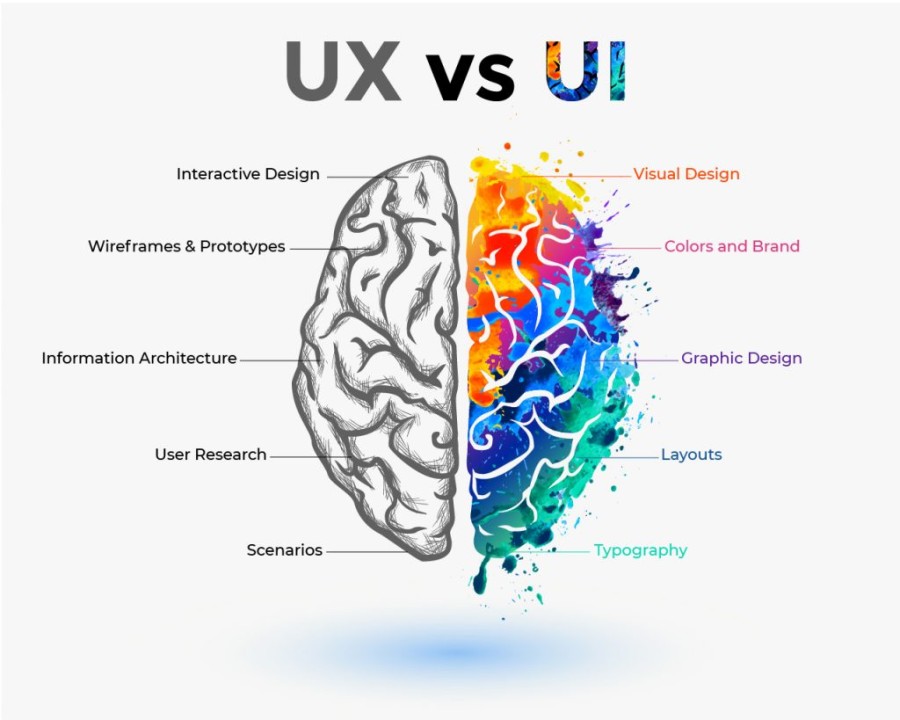
User Interface (UI) and User Experience (UX) are two of the most critical aspects of digital product design, yet they are often misunderstood or used interchangeably. While both focus on improving the interaction between users and digital products, they serve fundamentally different purposes and require distinct skill sets. UI design focuses primarily on the visual and interactive elements of a product—this includes layouts, color schemes, typography, buttons, icons, spacing, and all the touchpoints that a user sees and interacts with. The goal of UI is to create interfaces that are visually appealing, consistent, and intuitive, guiding users seamlessly through applications or websites. On the other hand, UX design encompasses the overall experience that a user has when interacting with a product. It is concerned with usability, functionality, navigation, information architecture, accessibility, and the emotional satisfaction of users. Simply put, UI is about how things look, while UX is about how things work. A product with excellent UI but poor UX may look visually stunning but frustrate users if it is difficult to navigate or perform tasks. Conversely, a product with strong UX but a poor interface may function efficiently but fail to engage users or convey the brand identity effectively. Both disciplines are interdependent: strong UX needs an effective UI to deliver its full potential, and a great UI must be supported by smooth, logical, and satisfying UX workflows. By understanding the distinction and synergy between UI and UX, designers, businesses, and developers can create products that not only look appealing but also deliver meaningful, seamless, and enjoyable experiences for users.
Designing for UI and UX is a structured process that involves research, planning, testing, and iteration. UX designers often start by understanding the target audience through methods such as surveys, interviews, focus groups, and analytics. They develop user personas, map user journeys, and identify pain points and goals to create wireframes and prototypes that define the product’s structure and workflow. The UX process ensures that the product is intuitive, accessible, and capable of meeting user expectations effectively. UI designers, meanwhile, take these wireframes and translate them into visually compelling interfaces, selecting colors, typography, icons, buttons, and interactive elements that align with brand identity and usability standards. UI designers focus on aesthetics, consistency, responsiveness across devices, and interactive feedback such as hover effects or transitions. Tools like Figma, Adobe XD, Sketch, InVision, and Canva are widely used to design, prototype, and test UI elements. Accessibility plays a critical role in UI/UX design, ensuring that digital products are usable by people with disabilities, including considerations like color contrast, keyboard navigation, screen reader compatibility, and mobile responsiveness. Testing and iteration are essential for both UI and UX, involving usability testing, A/B testing, and feedback analysis to refine the interface and workflow continuously. As mobile apps, web applications, and digital services become increasingly central to everyday life, businesses must recognize that effective UI/UX design is not optional—it is vital for user engagement, retention, and satisfaction. Properly executed UI/UX design boosts conversion rates, reduces bounce rates, strengthens brand credibility, and ensures a positive emotional connection between users and the product.
The future of UI and UX design continues to evolve with emerging technologies, trends, and user expectations. AI and machine learning are increasingly integrated into UX to personalize experiences, predict user behavior, and automate repetitive tasks, creating smarter interfaces that adapt to user needs. Motion design, micro-interactions, and augmented reality (AR) are being incorporated to enhance engagement and provide immersive experiences. Designers must stay updated with trends such as dark mode, neumorphism, minimalistic design, voice UI, and conversational interfaces, which influence how users perceive and interact with digital products. Moreover, the rise of inclusive design emphasizes creating experiences that accommodate diverse audiences, considering cultural differences, accessibility needs, and varying technological literacy. Understanding and implementing the difference between UI and UX ensures that digital products not only function effectively but also resonate emotionally with users. By combining visually appealing interfaces (UI) with intuitive, meaningful, and efficient experiences (UX),
designers can craft products that delight users, foster loyalty, and achieve business objectives. In an era where user experience defines success in digital products, mastering the synergy between UI and UX is essential for designers, developers, and businesses aiming to create impactful, user-centered solutions that stand out in a competitive digital landscape.
Designing for UI and UX is a structured process that involves research, planning, testing, and iteration. UX designers often start by understanding the target audience through methods such as surveys, interviews, focus groups, and analytics. They develop user personas, map user journeys, and identify pain points and goals to create wireframes and prototypes that define the product’s structure and workflow. The UX process ensures that the product is intuitive, accessible, and capable of meeting user expectations effectively. UI designers, meanwhile, take these wireframes and translate them into visually compelling interfaces, selecting colors, typography, icons, buttons, and interactive elements that align with brand identity and usability standards. UI designers focus on aesthetics, consistency, responsiveness across devices, and interactive feedback such as hover effects or transitions. Tools like Figma, Adobe XD, Sketch, InVision, and Canva are widely used to design, prototype, and test UI elements. Accessibility plays a critical role in UI/UX design, ensuring that digital products are usable by people with disabilities, including considerations like color contrast, keyboard navigation, screen reader compatibility, and mobile responsiveness. Testing and iteration are essential for both UI and UX, involving usability testing, A/B testing, and feedback analysis to refine the interface and workflow continuously. As mobile apps, web applications, and digital services become increasingly central to everyday life, businesses must recognize that effective UI/UX design is not optional—it is vital for user engagement, retention, and satisfaction. Properly executed UI/UX design boosts conversion rates, reduces bounce rates, strengthens brand credibility, and ensures a positive emotional connection between users and the product.
The future of UI and UX design continues to evolve with emerging technologies, trends, and user expectations. AI and machine learning are increasingly integrated into UX to personalize experiences, predict user behavior, and automate repetitive tasks, creating smarter interfaces that adapt to user needs. Motion design, micro-interactions, and augmented reality (AR) are being incorporated to enhance engagement and provide immersive experiences. Designers must stay updated with trends such as dark mode, neumorphism, minimalistic design, voice UI, and conversational interfaces, which influence how users perceive and interact with digital products. Moreover, the rise of inclusive design emphasizes creating experiences that accommodate diverse audiences, considering cultural differences, accessibility needs, and varying technological literacy. Understanding and implementing the difference between UI and UX ensures that digital products not only function effectively but also resonate emotionally with users. By combining visually appealing interfaces (UI) with intuitive, meaningful, and efficient experiences (UX),
designers can craft products that delight users, foster loyalty, and achieve business objectives. In an era where user experience defines success in digital products, mastering the synergy between UI and UX is essential for designers, developers, and businesses aiming to create impactful, user-centered solutions that stand out in a competitive digital landscape.