
Motion plays a powerful role in UI design by guiding attention, communicating status, and creating smooth transitions between states. This course focuses on storyboarding techniques that help designers plan motion before animation is built — ensuring every interaction is purposeful, intuitive, and aligned with brand personality.
Students begin with the fundamentals of motion UX: principles like easing, timing, anticipation, and continuity. Learners explore how motion influences user cognition, reduces uncertainty, and supports focus by signaling what is happening and what will happen next in an interface.
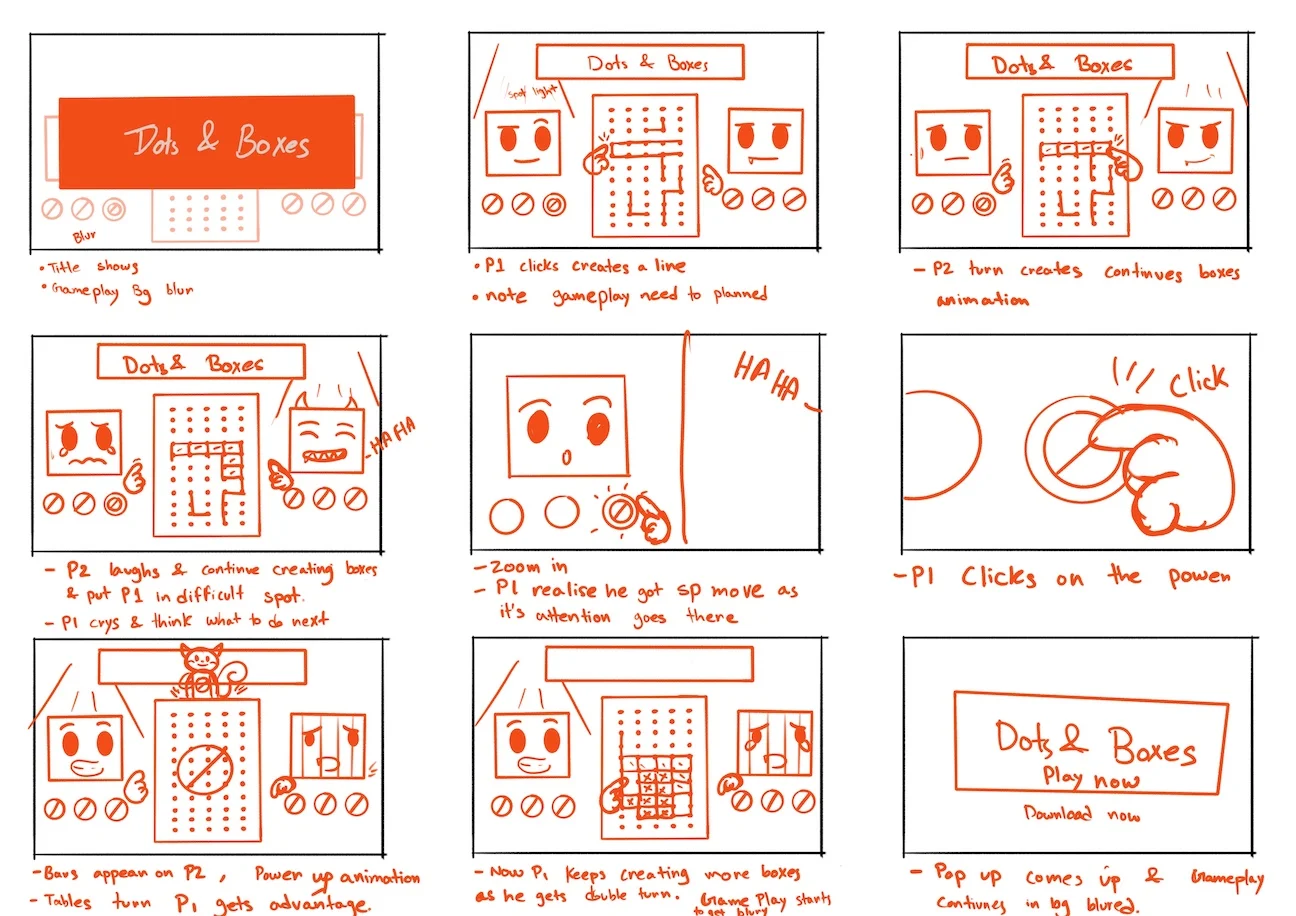
Storyboarding is introduced as a visual planning tool borrowed from film and animation. Through sequential frames, designers map out interactions such as page transitions, microinteractions, button feedback, and animated onboarding steps — all before any code is written.
Students practice defining motion intent by answering key questions: What is the user’s goal? What changes in the UI? How does motion reinforce hierarchy and context? These decisions ensure motion is meaningful rather than decorative.
Wireframe storyboards, motion flows, and annotated frames with timing references are developed to capture motion logic. Learners explore workflows using Figma, After Effects, Protopie, and hand-sketching to communicate interaction plans clearly with stakeholders and developers.
Accessibility in animated interfaces is also covered. Students learn safe motion principles such as reduced-motion settings, avoiding motion sickness triggers, and offering alternatives that preserve functionality while respecting user sensitivity.
Real-world case studies highlight motion design in top apps — focusing on delight moments, loading animations, and error state feedback that improves emotional connection and perceived performance.
By the end of the course, learners will be able to visualize and communicate motion concepts effectively, ensuring development teams deliver animation that improves usability, brand expression, and product delight.Motion plays a powerful role in UI design by guiding attention, communicating status, and creating smooth transitions between states. This course focuses on storyboarding techniques that help designers plan motion before animation is built — ensuring every interaction is purposeful, intuitive, and aligned with brand personality.
Students begin with the fundamentals of motion UX: principles like easing, timing, anticipation, and continuity. Learners explore how motion influences user cognition, reduces uncertainty, and supports focus by signaling what is happening and what will happen next in an interface.
Storyboarding is introduced as a visual planning tool borrowed from film and animation. Through sequential frames, designers map out interactions such as page transitions, microinteractions, button feedback, and animated onboarding steps — all before any code is written.
Students practice defining motion intent by answering key questions: What is the user’s goal? What changes in the UI? How does motion reinforce hierarchy and context? These decisions ensure motion is meaningful rather than decorative.
Wireframe storyboards, motion flows, and annotated frames with timing references are developed to capture motion logic. Learners explore workflows using Figma, After Effects, Protopie, and hand-sketching to communicate interaction plans clearly with stakeholders and developers.
Accessibility in animated interfaces is also covered. Students learn safe motion principles such as reduced-motion settings, avoiding motion sickness triggers, and offering alternatives that preserve functionality while respecting user sensitivity.
Real-world case studies highlight motion design in top apps — focusing on delight moments, loading animations, and error state feedback that improves emotional connection and perceived performance.
By the end of the course, learners will be able to visualize and communicate motion concepts effectively, ensuring development teams deliver animation that improves usability, brand expression, and product delight.
Students begin with the fundamentals of motion UX: principles like easing, timing, anticipation, and continuity. Learners explore how motion influences user cognition, reduces uncertainty, and supports focus by signaling what is happening and what will happen next in an interface.
Storyboarding is introduced as a visual planning tool borrowed from film and animation. Through sequential frames, designers map out interactions such as page transitions, microinteractions, button feedback, and animated onboarding steps — all before any code is written.
Students practice defining motion intent by answering key questions: What is the user’s goal? What changes in the UI? How does motion reinforce hierarchy and context? These decisions ensure motion is meaningful rather than decorative.
Wireframe storyboards, motion flows, and annotated frames with timing references are developed to capture motion logic. Learners explore workflows using Figma, After Effects, Protopie, and hand-sketching to communicate interaction plans clearly with stakeholders and developers.
Accessibility in animated interfaces is also covered. Students learn safe motion principles such as reduced-motion settings, avoiding motion sickness triggers, and offering alternatives that preserve functionality while respecting user sensitivity.
Real-world case studies highlight motion design in top apps — focusing on delight moments, loading animations, and error state feedback that improves emotional connection and perceived performance.
By the end of the course, learners will be able to visualize and communicate motion concepts effectively, ensuring development teams deliver animation that improves usability, brand expression, and product delight.Motion plays a powerful role in UI design by guiding attention, communicating status, and creating smooth transitions between states. This course focuses on storyboarding techniques that help designers plan motion before animation is built — ensuring every interaction is purposeful, intuitive, and aligned with brand personality.
Students begin with the fundamentals of motion UX: principles like easing, timing, anticipation, and continuity. Learners explore how motion influences user cognition, reduces uncertainty, and supports focus by signaling what is happening and what will happen next in an interface.
Storyboarding is introduced as a visual planning tool borrowed from film and animation. Through sequential frames, designers map out interactions such as page transitions, microinteractions, button feedback, and animated onboarding steps — all before any code is written.
Students practice defining motion intent by answering key questions: What is the user’s goal? What changes in the UI? How does motion reinforce hierarchy and context? These decisions ensure motion is meaningful rather than decorative.
Wireframe storyboards, motion flows, and annotated frames with timing references are developed to capture motion logic. Learners explore workflows using Figma, After Effects, Protopie, and hand-sketching to communicate interaction plans clearly with stakeholders and developers.
Accessibility in animated interfaces is also covered. Students learn safe motion principles such as reduced-motion settings, avoiding motion sickness triggers, and offering alternatives that preserve functionality while respecting user sensitivity.
Real-world case studies highlight motion design in top apps — focusing on delight moments, loading animations, and error state feedback that improves emotional connection and perceived performance.
By the end of the course, learners will be able to visualize and communicate motion concepts effectively, ensuring development teams deliver animation that improves usability, brand expression, and product delight.