
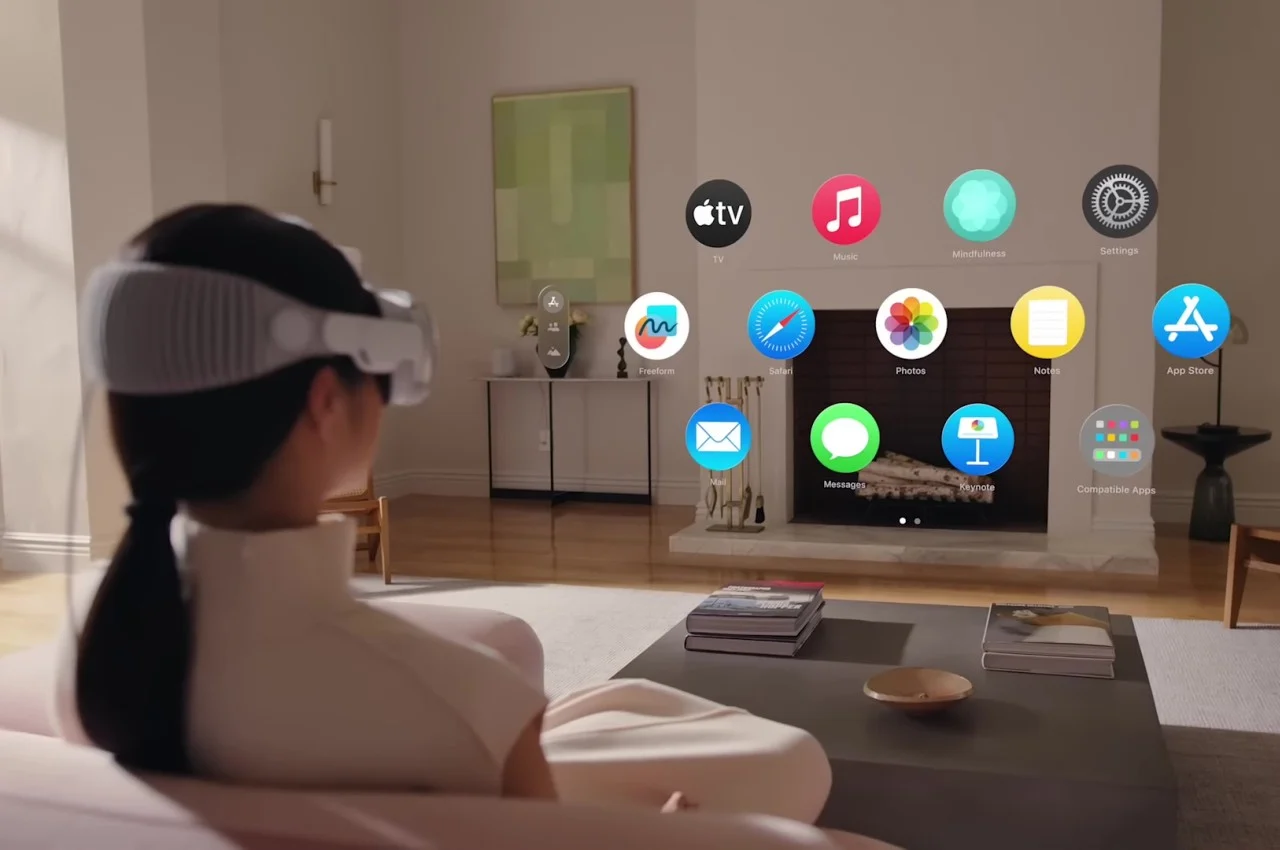
Spatial computing UI patterns define how users interact with digital content in three-dimensional environments across augmented reality (AR), virtual reality (VR), and mixed reality (MR). With devices such as Apple Vision Pro, Meta Quest, and Microsoft HoloLens becoming more advanced, spatial interface design is quickly emerging as a core discipline for next-generation immersive experiences. These environments blend physical and virtual elements, requiring UI designers to rethink traditional interaction models and explore new ways of enabling natural, intuitive engagement.
Unlike traditional 2D interfaces, spatial UIs must account for depth, scale, perspective, and real-world constraints. Designers must determine where to place virtual objects so they feel meaningful and usable within a 3D space. This can include anchoring UI elements to real-world surfaces, placing floating panels within an arm’s reach, or positioning tools around the user in a spatial workflow. Depth and distance become part of the design language, requiring thoughtful placement that avoids clutter, confusion, or visual overload.
Natural human behavior plays an essential role in spatial computing interaction design. These interfaces rely on gaze input, hand gestures, body movement, and spatial audio cues. To reduce cognitive load, interactions should mimic real-world physics—allowing users to grab objects, pinch to resize, push buttons, point to select, or even throw items in virtual space. When the interface aligns with innate human motion and perception, users can learn the system more quickly and feel more immersed in the experience.
Accessibility remains a fundamental challenge in spatial UI. Users may experience discomfort, motion sickness, or physical limitations that affect how they interact with immersive environments. Designers must offer alternative interaction modes such as teleportation navigation instead of continuous movement, simplified gesture sets for users with limited mobility, or adjustable field-of-view settings to minimize strain. Comfort-driven design ensures that spatial experiences are inclusive and suitable for long-term use.
Environmental context plays a major role in AR and MR interfaces. These systems must dynamically adapt to real-world lighting, surface textures, occlusions, shadows, and varying room dimensions. If an environment is too bright, too cluttered, or lacks recognizable surfaces, the UI must still remain legible and responsive. Designers need to consider environmental unpredictability and ensure that crucial elements remain visible, stable, and interactable regardless of user surroundings.
Visual hierarchy functions differently in three-dimensional space. Rather than relying solely on size, color, and contrast, spatial UIs incorporate depth cues, motion, volumetric lighting, and shadows to indicate importance and direct attention. Objects placed closer often signal higher priority, while motion cues help highlight actionable elements. Thoughtful layering prevents overcrowding and ensures that users can focus on the most relevant information without distraction.
Safety is an indispensable part of spatial computing design. Because users may move physically in real-world environments while wearing headsets, spatial UIs must prevent accidental collisions or unsafe behavior. Features like boundary systems, passthrough warnings, virtual safety zones, and contextual alerts help users maintain awareness of their surroundings. These systems reduce risk and ensure users remain protected during immersive interactions.
As the spatial computing ecosystem grows, cross-platform design standards are becoming increasingly important. Users expect consistent gesture vocabularies, spatial layouts, and interaction models across different XR devices. A unified design language helps users transition smoothly from one system to another without relearning basic functions. This interoperability is essential for the broader adoption of spatial computing technologies.
Spatial computing UI patterns open the door to richer, more immersive digital experiences by leveraging the full potential of three-dimensional interaction. As AR, VR, and MR continue to expand into mainstream use, designers who master spatial interface principles will shape the next era of human–computer interaction—one where digital content blends seamlessly with the physical world.
Unlike traditional 2D interfaces, spatial UIs must account for depth, scale, perspective, and real-world constraints. Designers must determine where to place virtual objects so they feel meaningful and usable within a 3D space. This can include anchoring UI elements to real-world surfaces, placing floating panels within an arm’s reach, or positioning tools around the user in a spatial workflow. Depth and distance become part of the design language, requiring thoughtful placement that avoids clutter, confusion, or visual overload.
Natural human behavior plays an essential role in spatial computing interaction design. These interfaces rely on gaze input, hand gestures, body movement, and spatial audio cues. To reduce cognitive load, interactions should mimic real-world physics—allowing users to grab objects, pinch to resize, push buttons, point to select, or even throw items in virtual space. When the interface aligns with innate human motion and perception, users can learn the system more quickly and feel more immersed in the experience.
Accessibility remains a fundamental challenge in spatial UI. Users may experience discomfort, motion sickness, or physical limitations that affect how they interact with immersive environments. Designers must offer alternative interaction modes such as teleportation navigation instead of continuous movement, simplified gesture sets for users with limited mobility, or adjustable field-of-view settings to minimize strain. Comfort-driven design ensures that spatial experiences are inclusive and suitable for long-term use.
Environmental context plays a major role in AR and MR interfaces. These systems must dynamically adapt to real-world lighting, surface textures, occlusions, shadows, and varying room dimensions. If an environment is too bright, too cluttered, or lacks recognizable surfaces, the UI must still remain legible and responsive. Designers need to consider environmental unpredictability and ensure that crucial elements remain visible, stable, and interactable regardless of user surroundings.
Visual hierarchy functions differently in three-dimensional space. Rather than relying solely on size, color, and contrast, spatial UIs incorporate depth cues, motion, volumetric lighting, and shadows to indicate importance and direct attention. Objects placed closer often signal higher priority, while motion cues help highlight actionable elements. Thoughtful layering prevents overcrowding and ensures that users can focus on the most relevant information without distraction.
Safety is an indispensable part of spatial computing design. Because users may move physically in real-world environments while wearing headsets, spatial UIs must prevent accidental collisions or unsafe behavior. Features like boundary systems, passthrough warnings, virtual safety zones, and contextual alerts help users maintain awareness of their surroundings. These systems reduce risk and ensure users remain protected during immersive interactions.
As the spatial computing ecosystem grows, cross-platform design standards are becoming increasingly important. Users expect consistent gesture vocabularies, spatial layouts, and interaction models across different XR devices. A unified design language helps users transition smoothly from one system to another without relearning basic functions. This interoperability is essential for the broader adoption of spatial computing technologies.
Spatial computing UI patterns open the door to richer, more immersive digital experiences by leveraging the full potential of three-dimensional interaction. As AR, VR, and MR continue to expand into mainstream use, designers who master spatial interface principles will shape the next era of human–computer interaction—one where digital content blends seamlessly with the physical world.