
Push notifications are one of the most essential tools for modern mobile applications because they enable instant communication with users even when the app is closed. Unlike SMS or emails, push notifications appear directly on the user’s device through the system notification tray, making them highly visible and impactful. They allow apps to deliver updates such as offers, reminders, alerts, promotions, delivery updates, chat messages, or news in real time. For businesses, push notifications increase user engagement and retention by reminding users about important events or encouraging them to return to the app. For developers, mastering notification architecture, platform differences, security rules, and delivery mechanics is crucial for building powerful, responsive, and user-centric mobile applications.
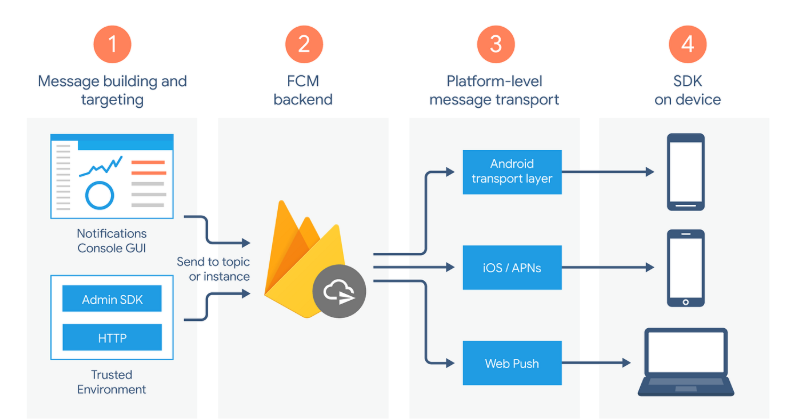
Push notifications follow a well-defined communication architecture involving three key components: the app, the app server, and the push notification service provider (FCM for Android, APNs for iOS). When the user installs an app, the device generates a unique registration token. This token is stored on the backend server. When the server needs to send a message, it forwards the notification payload to FCM or APNs, which then deliver it to the user's device. Notifications can contain a notification payload (used for displaying pop-ups) or a data payload (used for background processing). Understanding this flow allows developers to build scalable systems capable of sending millions of messages efficiently. Behind the scenes, the OS ensures optimization, throttling, batching, and battery-friendly delivery.
Firebase Cloud Messaging is the most widely used system for Android and multiplatform applications built using Flutter, React Native, or Unity. FCM supports three types of messages: notification messages, data messages, and combined messages. Notification messages are handled automatically by the OS, while data messages give developers full control. FCM includes features like topic messaging, device-to-device messaging, click actions, high-priority notifications, scheduled alerts, and analytics tracking. Developers can group users into topics like “Offers,” “News,” or “Sports” so that the server sends a single message to thousands of subscribers at once. Integrating FCM requires generating an API key, configuring project settings, enabling notifications in the manifest or Info.plist, and writing logic to handle foreground and background messages in the app.
APNs is the official push notification system for iPhone and iPad. Unlike Android, Apple follows extremely strict security and privacy standards. Every notification sent to an iOS device must be signed using a unique certificate or authentication token stored on the backend server. APNs manages quality-of-service levels, payload size restrictions, and advanced notification features such as mutable content, notification service extensions, and notification content extensions. These extensions allow developers to enhance notifications with images, videos, buttons, or custom layouts. iOS also supports silent notifications, which wake the app in the background to sync data without displaying a message. Understanding these features helps developers build rich, interactive, and highly customizable notification experiences.
Push notifications can be classified into several categories depending on the application’s purpose. Transactional notifications deliver essential real-time information, such as OTPs, order updates, or payment confirmations. Marketing notifications promote discounts, offers, or new arrivals. Behavior-based notifications rely on analytics to trigger alerts based on user activity—for example, reminding a user to complete a purchase when they abandon their cart. Geo-targeted notifications deliver messages based on the user’s location, useful in apps like retail, travel, and delivery services. Scheduled notifications send reminders at the right time, such as for fitness, medicine, or task-tracking apps. Each type serves a different purpose, and selecting the right mix helps create a balanced, non-intrusive communication strategy.
Both Android and iOS now require explicit permission before apps can send notifications. This change ensures that users have full control over what they want to receive. Developers must provide clear explanations about why the app needs notifications. Apps should request permission at the right moment—only when the user interacts with features requiring notifications. Aggressive or early permission requests cause users to deny access. Additionally, apps must offer in-app settings that allow users to customize notification preferences. Creating transparency builds trust and increases opt-in rates. Apple and Google also enforce strict review guidelines related to notification usage, especially for marketing messages, making responsible notification design a must.
Good notification strategy separates successful apps from annoying ones. Users tend to uninstall apps that send too many alerts, irrelevant content, or spammy promotional messages. Developers must follow the “less but meaningful” rule. This involves analyzing user behavior, preferences, and engagement patterns to send personalized messages at the right time. Notifications should include clear titles, short bodies, call-to-action buttons, deep links to specific pages within the app, and rich media elements where required. Timing is critical—sending notifications at odd hours creates a negative user experience. A well-designed notification strategy uses segmentation, behavioral triggers, and machine learning to optimize reach without irritating users.
Modern push notification systems support advanced features that significantly enhance user engagement. Rich notifications allow images, GIFs, carousels, and quick-action buttons. Scheduled notifications help apps deliver reminders or alerts at future times without involving backend servers. In-app notifications provide a quieter alternative when push alerts are not necessary. Analytics tools like Firebase Analytics, OneSignal, MoEngage, and CleverTap help track delivery rates, open rates, conversions, geographic performance, and user segments. This data enables developers and marketing teams to measure the effectiveness of notification campaigns and improve them iteratively. Machine learning-driven platforms even auto-optimize delivery timing for maximum engagement.
Security is critical in push notification systems because messages travel through external services before reaching users. Servers must store notification tokens securely, implement encryption, validate payloads, and protect API keys. Notifications should never contain sensitive information such as passwords or personal identity details. To improve reliability, developers use strategies like retry queues, exponential backoff, topic-based messaging, and load-balanced servers. Testing is equally important—developers must test notifications in foreground, background, locked screen, offline conditions, and different device versions. Following best practices ensures reliable delivery, safe communication, high user trust, and a polished overall user experience.
Push notifications follow a well-defined communication architecture involving three key components: the app, the app server, and the push notification service provider (FCM for Android, APNs for iOS). When the user installs an app, the device generates a unique registration token. This token is stored on the backend server. When the server needs to send a message, it forwards the notification payload to FCM or APNs, which then deliver it to the user's device. Notifications can contain a notification payload (used for displaying pop-ups) or a data payload (used for background processing). Understanding this flow allows developers to build scalable systems capable of sending millions of messages efficiently. Behind the scenes, the OS ensures optimization, throttling, batching, and battery-friendly delivery.
Firebase Cloud Messaging is the most widely used system for Android and multiplatform applications built using Flutter, React Native, or Unity. FCM supports three types of messages: notification messages, data messages, and combined messages. Notification messages are handled automatically by the OS, while data messages give developers full control. FCM includes features like topic messaging, device-to-device messaging, click actions, high-priority notifications, scheduled alerts, and analytics tracking. Developers can group users into topics like “Offers,” “News,” or “Sports” so that the server sends a single message to thousands of subscribers at once. Integrating FCM requires generating an API key, configuring project settings, enabling notifications in the manifest or Info.plist, and writing logic to handle foreground and background messages in the app.
APNs is the official push notification system for iPhone and iPad. Unlike Android, Apple follows extremely strict security and privacy standards. Every notification sent to an iOS device must be signed using a unique certificate or authentication token stored on the backend server. APNs manages quality-of-service levels, payload size restrictions, and advanced notification features such as mutable content, notification service extensions, and notification content extensions. These extensions allow developers to enhance notifications with images, videos, buttons, or custom layouts. iOS also supports silent notifications, which wake the app in the background to sync data without displaying a message. Understanding these features helps developers build rich, interactive, and highly customizable notification experiences.
Push notifications can be classified into several categories depending on the application’s purpose. Transactional notifications deliver essential real-time information, such as OTPs, order updates, or payment confirmations. Marketing notifications promote discounts, offers, or new arrivals. Behavior-based notifications rely on analytics to trigger alerts based on user activity—for example, reminding a user to complete a purchase when they abandon their cart. Geo-targeted notifications deliver messages based on the user’s location, useful in apps like retail, travel, and delivery services. Scheduled notifications send reminders at the right time, such as for fitness, medicine, or task-tracking apps. Each type serves a different purpose, and selecting the right mix helps create a balanced, non-intrusive communication strategy.
Both Android and iOS now require explicit permission before apps can send notifications. This change ensures that users have full control over what they want to receive. Developers must provide clear explanations about why the app needs notifications. Apps should request permission at the right moment—only when the user interacts with features requiring notifications. Aggressive or early permission requests cause users to deny access. Additionally, apps must offer in-app settings that allow users to customize notification preferences. Creating transparency builds trust and increases opt-in rates. Apple and Google also enforce strict review guidelines related to notification usage, especially for marketing messages, making responsible notification design a must.
Good notification strategy separates successful apps from annoying ones. Users tend to uninstall apps that send too many alerts, irrelevant content, or spammy promotional messages. Developers must follow the “less but meaningful” rule. This involves analyzing user behavior, preferences, and engagement patterns to send personalized messages at the right time. Notifications should include clear titles, short bodies, call-to-action buttons, deep links to specific pages within the app, and rich media elements where required. Timing is critical—sending notifications at odd hours creates a negative user experience. A well-designed notification strategy uses segmentation, behavioral triggers, and machine learning to optimize reach without irritating users.
Modern push notification systems support advanced features that significantly enhance user engagement. Rich notifications allow images, GIFs, carousels, and quick-action buttons. Scheduled notifications help apps deliver reminders or alerts at future times without involving backend servers. In-app notifications provide a quieter alternative when push alerts are not necessary. Analytics tools like Firebase Analytics, OneSignal, MoEngage, and CleverTap help track delivery rates, open rates, conversions, geographic performance, and user segments. This data enables developers and marketing teams to measure the effectiveness of notification campaigns and improve them iteratively. Machine learning-driven platforms even auto-optimize delivery timing for maximum engagement.
Security is critical in push notification systems because messages travel through external services before reaching users. Servers must store notification tokens securely, implement encryption, validate payloads, and protect API keys. Notifications should never contain sensitive information such as passwords or personal identity details. To improve reliability, developers use strategies like retry queues, exponential backoff, topic-based messaging, and load-balanced servers. Testing is equally important—developers must test notifications in foreground, background, locked screen, offline conditions, and different device versions. Following best practices ensures reliable delivery, safe communication, high user trust, and a polished overall user experience.