
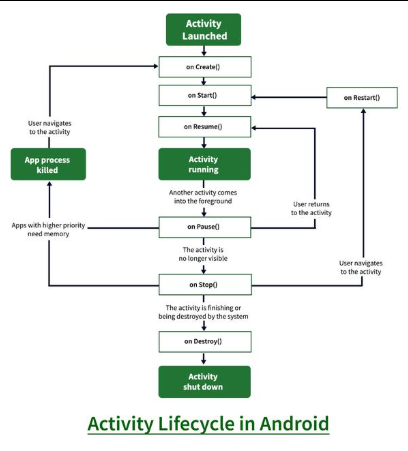
Every mobile application goes through a series of states from the moment it launches until it closes. This concept is known as the app lifecycle, and it plays a crucial role in how your application behaves, performs, and responds to user interactions. On platforms like Android, this lifecycle includes events such as onCreate, onStart, onResume, onPause, onStop, and onDestroy, while iOS uses states such as Not Running, Inactive, Active, Background, and Suspended. Developers must understand how these states impact resources like memory, CPU usage, network calls, sensors, and UI components. A well-managed lifecycle ensures smooth performance, reduced battery consumption, and better overall user experience, especially on resource-constrained mobile devices.
In Android development, the Activity lifecycle is one of the most fundamental concepts. Activities represent screens in an application, and each lifecycle callback helps developers manage tasks appropriately. onCreate() initializes UI elements, onStart() activates the interface, and onResume() handles interactions when the app is in the foreground. When the app is partially visible, onPause() gets triggered, and onStop() runs when the app is pushed to the background. Finally, onDestroy() cleans up memory before the activity is removed. Fragments follow a more complex lifecycle because they can be dynamically added or removed from activities. Understanding these events helps developers manage UI updates, stop background operations at the right time, and prevent memory leaks in long-running applications.
On iOS, apps follow a slightly different lifecycle defined by the system. When launched, the app goes from Not Running → Inactive → Active, allowing developers to prepare UI and restore user sessions. When the app receives a call or the user switches apps, it transitions from Active → Inactive → Background. In the Background state, apps may run short tasks before entering Suspended, where they remain in memory but are not executing code. iOS prioritizes power efficiency and memory management, so developers must optimize tasks like API calls, animations, or downloads. Understanding iOS lifecycle behavior is essential for building responsive, smooth, and energy-efficient applications that comply with Apple’s strict design guidelines.
In real-world scenarios, lifecycle awareness determines whether your app handles interruptions gracefully. For example, if a user is filling out a form and gets a call, the data must be saved during onPause/onSaveInstanceState events. If your app streams videos, you must pause playback when the app enters the background. Likewise, long-running tasks such as downloading files or uploading data must be managed carefully, using background services or workers instead of running directly in UI components. Improper lifecycle management leads to crashes, freezes, excessive battery drain, and a poor user experience. Developers often use architectures like MVVM, ViewModel, or LiveData to ensure that data persists even when UI components are destroyed or recreated due to configuration changes like screen rotation.
Modern mobile applications require permissions to access sensitive features such as location, camera, microphone, contacts, call logs, files, and sensors. To protect users, Android and iOS enforce a strict runtime permission model, meaning apps must request permission while running, not only during installation. Permissions are categorized into normal, dangerous, and system-level. Normal permissions are automatically granted, while dangerous permissions—like camera, microphone, and location—require explicit user approval. Developers must explain why an app needs certain permissions to avoid user distrust and rejections on app stores. Requesting unnecessary permissions can negatively impact app ratings and violate privacy regulations.
When requesting permissions, apps must display a system dialog where users can allow or deny access. Android uses methods like requestPermissions() and iOS uses Info.plist keys for permission descriptions. If the user denies permission, the app must gracefully handle the scenario by disabling related features or showing alternative options. In cases where users permanently block permission (“Don't ask again”), apps must guide them to settings without forcing the action. Good apps provide pre-permission prompts explaining how the requested permission enhances functionality. Clear communication increases user trust and improves the chances of permission acceptance.
Apps should only request permissions when absolutely required. Delaying the permission request until the feature is needed improves user understanding. For example, instead of asking for camera permission at launch, ask when the user taps “Take Photo.” Developers must also avoid collecting unnecessary data, following privacy standards such as GDPR, CCPA, and platform-specific guidelines. Storing sensitive data should be done securely using encrypted storage. Implementing permission rationale dialogs, fallback flows, and privacy settings inside the app strengthens user trust. Many organizations conduct privacy audits to ensure the app follows regulatory norms and maintains security compliance.
Background operations such as tracking location, sending notifications, or running periodic updates must comply with lifecycle rules and permission requirements. For instance, apps using background location must request foreground and background location permissions, with strict usage guidelines on both platforms. Developers use tools like WorkManager (Android) or BackgroundTasks (iOS) to schedule tasks that run even when the app is not active. Improper usage may lead to app store rejection, restricted functionality, or forced termination by the OS. Efficient handling of lifecycle combined with appropriate permissions creates a seamless user experience while ensuring system stability and minimal battery usage.
Testing lifecycle events is essential, especially for apps that rely on sensors, networking, or background work. Developers simulate events such as screen rotations, incoming calls, low memory scenarios, and switching between apps. Tools like Android Studio’s Lifecycle Inspector, Xcode’s State Restoration, and automated UI tests help ensure stable behavior. Permissions testing is equally important—developers must verify all acceptance and denial scenarios. For store compliance, both Google Play and Apple’s App Store require proper permission declarations and justification. Failing to follow guidelines can cause app rejection. Successful apps combine well-managed lifecycle design with transparent permission handling to deliver secure, efficient, and user-friendly experiences.
In Android development, the Activity lifecycle is one of the most fundamental concepts. Activities represent screens in an application, and each lifecycle callback helps developers manage tasks appropriately. onCreate() initializes UI elements, onStart() activates the interface, and onResume() handles interactions when the app is in the foreground. When the app is partially visible, onPause() gets triggered, and onStop() runs when the app is pushed to the background. Finally, onDestroy() cleans up memory before the activity is removed. Fragments follow a more complex lifecycle because they can be dynamically added or removed from activities. Understanding these events helps developers manage UI updates, stop background operations at the right time, and prevent memory leaks in long-running applications.
On iOS, apps follow a slightly different lifecycle defined by the system. When launched, the app goes from Not Running → Inactive → Active, allowing developers to prepare UI and restore user sessions. When the app receives a call or the user switches apps, it transitions from Active → Inactive → Background. In the Background state, apps may run short tasks before entering Suspended, where they remain in memory but are not executing code. iOS prioritizes power efficiency and memory management, so developers must optimize tasks like API calls, animations, or downloads. Understanding iOS lifecycle behavior is essential for building responsive, smooth, and energy-efficient applications that comply with Apple’s strict design guidelines.
In real-world scenarios, lifecycle awareness determines whether your app handles interruptions gracefully. For example, if a user is filling out a form and gets a call, the data must be saved during onPause/onSaveInstanceState events. If your app streams videos, you must pause playback when the app enters the background. Likewise, long-running tasks such as downloading files or uploading data must be managed carefully, using background services or workers instead of running directly in UI components. Improper lifecycle management leads to crashes, freezes, excessive battery drain, and a poor user experience. Developers often use architectures like MVVM, ViewModel, or LiveData to ensure that data persists even when UI components are destroyed or recreated due to configuration changes like screen rotation.
Modern mobile applications require permissions to access sensitive features such as location, camera, microphone, contacts, call logs, files, and sensors. To protect users, Android and iOS enforce a strict runtime permission model, meaning apps must request permission while running, not only during installation. Permissions are categorized into normal, dangerous, and system-level. Normal permissions are automatically granted, while dangerous permissions—like camera, microphone, and location—require explicit user approval. Developers must explain why an app needs certain permissions to avoid user distrust and rejections on app stores. Requesting unnecessary permissions can negatively impact app ratings and violate privacy regulations.
When requesting permissions, apps must display a system dialog where users can allow or deny access. Android uses methods like requestPermissions() and iOS uses Info.plist keys for permission descriptions. If the user denies permission, the app must gracefully handle the scenario by disabling related features or showing alternative options. In cases where users permanently block permission (“Don't ask again”), apps must guide them to settings without forcing the action. Good apps provide pre-permission prompts explaining how the requested permission enhances functionality. Clear communication increases user trust and improves the chances of permission acceptance.
Apps should only request permissions when absolutely required. Delaying the permission request until the feature is needed improves user understanding. For example, instead of asking for camera permission at launch, ask when the user taps “Take Photo.” Developers must also avoid collecting unnecessary data, following privacy standards such as GDPR, CCPA, and platform-specific guidelines. Storing sensitive data should be done securely using encrypted storage. Implementing permission rationale dialogs, fallback flows, and privacy settings inside the app strengthens user trust. Many organizations conduct privacy audits to ensure the app follows regulatory norms and maintains security compliance.
Background operations such as tracking location, sending notifications, or running periodic updates must comply with lifecycle rules and permission requirements. For instance, apps using background location must request foreground and background location permissions, with strict usage guidelines on both platforms. Developers use tools like WorkManager (Android) or BackgroundTasks (iOS) to schedule tasks that run even when the app is not active. Improper usage may lead to app store rejection, restricted functionality, or forced termination by the OS. Efficient handling of lifecycle combined with appropriate permissions creates a seamless user experience while ensuring system stability and minimal battery usage.
Testing lifecycle events is essential, especially for apps that rely on sensors, networking, or background work. Developers simulate events such as screen rotations, incoming calls, low memory scenarios, and switching between apps. Tools like Android Studio’s Lifecycle Inspector, Xcode’s State Restoration, and automated UI tests help ensure stable behavior. Permissions testing is equally important—developers must verify all acceptance and denial scenarios. For store compliance, both Google Play and Apple’s App Store require proper permission declarations and justification. Failing to follow guidelines can cause app rejection. Successful apps combine well-managed lifecycle design with transparent permission handling to deliver secure, efficient, and user-friendly experiences.