
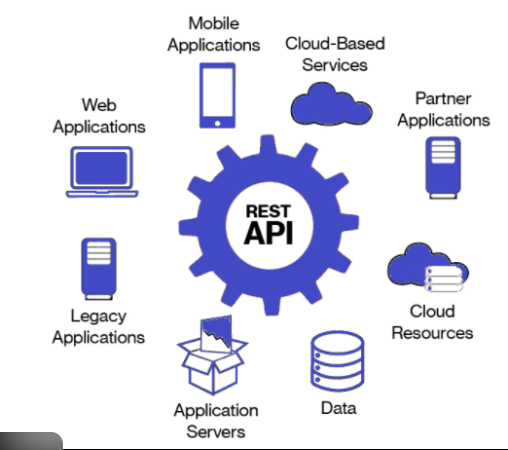
In modern mobile applications, APIs form the backbone of all external communication. Whether you are building a food delivery app, a social media platform, an e-commerce system, or a travel planner, APIs handle the interaction between the mobile frontend and backend services. API stands for Application Programming Interface, which allows mobile apps to send and receive data using standard protocols such as HTTP/HTTPS. Without APIs, apps would be limited to local storage and offline features only. The use of networking enables dynamic content, real-time updates, authentication, cloud connectivity, IoT integration, payment gateways, and more. APIs essentially transform a static app into an intelligent, connected, and interactive system.
Most mobile apps today rely on REST (Representational State Transfer) APIs, which follow a structured way of sending data over the web. A REST API exposes endpoints, which act as URLs to access specific features or data types. Common HTTP methods include GET (retrieve data), POST (send data), PUT/PATCH (update data), and DELETE (remove data). Mobile developers use libraries such as Retrofit/Volley (Android), Alamofire (iOS), and Dio/HTTP (Flutter) to consume REST APIs easily. During communication, data is primarily exchanged in JSON format because it is lightweight, readable, and efficient. Understanding endpoints, parameters, and request/response structures is fundamental for mobile developers who want to build scalable applications.
Security plays a crucial role in networking because mobile apps handle sensitive user data like login credentials, payment information, and personal identity details. API authentication is typically implemented using methods like API Keys, Basic Auth, OAuth 2.0, JWT tokens, or Firebase Auth. JWT tokens have become especially popular since they allow secure, stateless authentication where the user’s identity is stored inside an encrypted token. Developers must enforce HTTPS, use secure storage for tokens (Keychain, EncryptedSharedPrefs), and avoid exposing API keys in the app. Backend servers should enforce rate limiting, input validation, IP whitelisting, and encrypted communication to prevent cyber threats such as Man-in-the-Middle (MITM) attacks, API abuse, and session hijacking.
To avoid writing raw HTTP code, developers rely on powerful networking libraries. In Android development, Retrofit has become the industry standard due to its type-safe API calls, automatic JSON parsing using Gson/Moshi, coroutines support, and clean architecture compatibility. Volley is used for faster, lightweight requests. iOS developers use URLSession or Alamofire, while Flutter developers use Dio, known for interceptors, timeout handling, and cancelable requests. Networking libraries make API integration more consistent, efficient, and maintainable by handling retries, error responses, serialization, caching, and background threading automatically. As a result, developers can focus on app logic instead of low-level networking complexities.
Once the app receives data from APIs, the JSON response must be parsed into objects or models that the app can easily understand. JSON parsing can be done manually, but libraries like Gson, Moshi, Codable (iOS), and json_serializable (Flutter) automate the process. This step is critical because incorrect parsing can lead to app crashes or corrupted data. Modern mobile development emphasizes model classes that represent API responses, making the codebase more structured. Proper serialization ensures that outgoing requests are also formatted correctly. In large-scale apps, developers implement data mappers, DTOs (Data Transfer Objects), and repository patterns to keep API logic separate from UI logic, improving maintainability and scalability.
Network connectivity is unpredictable, especially on mobile devices where users frequently switch between WiFi and cellular data. Developers must design robust error-handling systems to manage failures such as timeouts, server errors, authentication failures, invalid inputs, and no internet availability. A professional mobile app displays friendly messages like “No Internet Connection” or “Something went wrong.” Networking libraries provide built-in tools for handling retries, exponential backoff, and token refresh mechanisms. Ensuring seamless user experience even during faults is a hallmark of a well-designed mobile network layer. Additionally, developers must test apps under various network conditions using tools like network link conditioners or Android's network throttling settings.
Large datasets—feeds, product lists, chat messages—cannot be loaded at once. To handle this, APIs use pagination methods like page-based, cursor-based, or offset-based pagination. Mobile apps fetch small chunks of data at a time, improving both speed and memory efficiency. Performance further improves by using caching mechanisms, such as Room DB, SharedPreferences, SQLite, or on-device storage, to store previously fetched API results. Caching reduces server load, speeds up the app, and supports limited offline functionality. Developers also use techniques like image lazy loading, compression, response caching headers, and query optimization to enhance overall performance.
Certain applications require real-time connectivity, such as chat apps, trading apps, delivery tracking, and IoT dashboards. REST APIs are not ideal for live updates, so developers use technologies like WebSockets, which maintain a two-way connection, allowing the server to push updates instantly. MQTT is preferred for lightweight IoT communication due to its low-power, low-bandwidth nature. For push notifications, Firebase Cloud Messaging (FCM) allows servers to notify mobile users instantly. Real-time communication transforms the app from a static interface into a dynamic, live user experience. Managing connection states, reconnections, heartbeat messages, and server synchronization is essential for robust real-time networking implementation.
Before releasing a mobile app, developers must test APIs thoroughly using tools like Postman, Insomnia, or Swagger. These tools help developers verify endpoint behavior, inspect request/response structures, test authentication, and simulate error conditions. Mobile developers also use debugging tools like Charles Proxy, Android Studio Network Inspector, and Xcode Instruments to monitor API calls in real time. Good API documentation is crucial for faster development—Swagger/OpenAPI specifications automatically generate clear docs that developers can reference. Thorough testing ensures smoother releases, fewer bugs, and predictable performance in production environments.
Most mobile apps today rely on REST (Representational State Transfer) APIs, which follow a structured way of sending data over the web. A REST API exposes endpoints, which act as URLs to access specific features or data types. Common HTTP methods include GET (retrieve data), POST (send data), PUT/PATCH (update data), and DELETE (remove data). Mobile developers use libraries such as Retrofit/Volley (Android), Alamofire (iOS), and Dio/HTTP (Flutter) to consume REST APIs easily. During communication, data is primarily exchanged in JSON format because it is lightweight, readable, and efficient. Understanding endpoints, parameters, and request/response structures is fundamental for mobile developers who want to build scalable applications.
Security plays a crucial role in networking because mobile apps handle sensitive user data like login credentials, payment information, and personal identity details. API authentication is typically implemented using methods like API Keys, Basic Auth, OAuth 2.0, JWT tokens, or Firebase Auth. JWT tokens have become especially popular since they allow secure, stateless authentication where the user’s identity is stored inside an encrypted token. Developers must enforce HTTPS, use secure storage for tokens (Keychain, EncryptedSharedPrefs), and avoid exposing API keys in the app. Backend servers should enforce rate limiting, input validation, IP whitelisting, and encrypted communication to prevent cyber threats such as Man-in-the-Middle (MITM) attacks, API abuse, and session hijacking.
To avoid writing raw HTTP code, developers rely on powerful networking libraries. In Android development, Retrofit has become the industry standard due to its type-safe API calls, automatic JSON parsing using Gson/Moshi, coroutines support, and clean architecture compatibility. Volley is used for faster, lightweight requests. iOS developers use URLSession or Alamofire, while Flutter developers use Dio, known for interceptors, timeout handling, and cancelable requests. Networking libraries make API integration more consistent, efficient, and maintainable by handling retries, error responses, serialization, caching, and background threading automatically. As a result, developers can focus on app logic instead of low-level networking complexities.
Once the app receives data from APIs, the JSON response must be parsed into objects or models that the app can easily understand. JSON parsing can be done manually, but libraries like Gson, Moshi, Codable (iOS), and json_serializable (Flutter) automate the process. This step is critical because incorrect parsing can lead to app crashes or corrupted data. Modern mobile development emphasizes model classes that represent API responses, making the codebase more structured. Proper serialization ensures that outgoing requests are also formatted correctly. In large-scale apps, developers implement data mappers, DTOs (Data Transfer Objects), and repository patterns to keep API logic separate from UI logic, improving maintainability and scalability.
Network connectivity is unpredictable, especially on mobile devices where users frequently switch between WiFi and cellular data. Developers must design robust error-handling systems to manage failures such as timeouts, server errors, authentication failures, invalid inputs, and no internet availability. A professional mobile app displays friendly messages like “No Internet Connection” or “Something went wrong.” Networking libraries provide built-in tools for handling retries, exponential backoff, and token refresh mechanisms. Ensuring seamless user experience even during faults is a hallmark of a well-designed mobile network layer. Additionally, developers must test apps under various network conditions using tools like network link conditioners or Android's network throttling settings.
Large datasets—feeds, product lists, chat messages—cannot be loaded at once. To handle this, APIs use pagination methods like page-based, cursor-based, or offset-based pagination. Mobile apps fetch small chunks of data at a time, improving both speed and memory efficiency. Performance further improves by using caching mechanisms, such as Room DB, SharedPreferences, SQLite, or on-device storage, to store previously fetched API results. Caching reduces server load, speeds up the app, and supports limited offline functionality. Developers also use techniques like image lazy loading, compression, response caching headers, and query optimization to enhance overall performance.
Certain applications require real-time connectivity, such as chat apps, trading apps, delivery tracking, and IoT dashboards. REST APIs are not ideal for live updates, so developers use technologies like WebSockets, which maintain a two-way connection, allowing the server to push updates instantly. MQTT is preferred for lightweight IoT communication due to its low-power, low-bandwidth nature. For push notifications, Firebase Cloud Messaging (FCM) allows servers to notify mobile users instantly. Real-time communication transforms the app from a static interface into a dynamic, live user experience. Managing connection states, reconnections, heartbeat messages, and server synchronization is essential for robust real-time networking implementation.
Before releasing a mobile app, developers must test APIs thoroughly using tools like Postman, Insomnia, or Swagger. These tools help developers verify endpoint behavior, inspect request/response structures, test authentication, and simulate error conditions. Mobile developers also use debugging tools like Charles Proxy, Android Studio Network Inspector, and Xcode Instruments to monitor API calls in real time. Good API documentation is crucial for faster development—Swagger/OpenAPI specifications automatically generate clear docs that developers can reference. Thorough testing ensures smoother releases, fewer bugs, and predictable performance in production environments.