
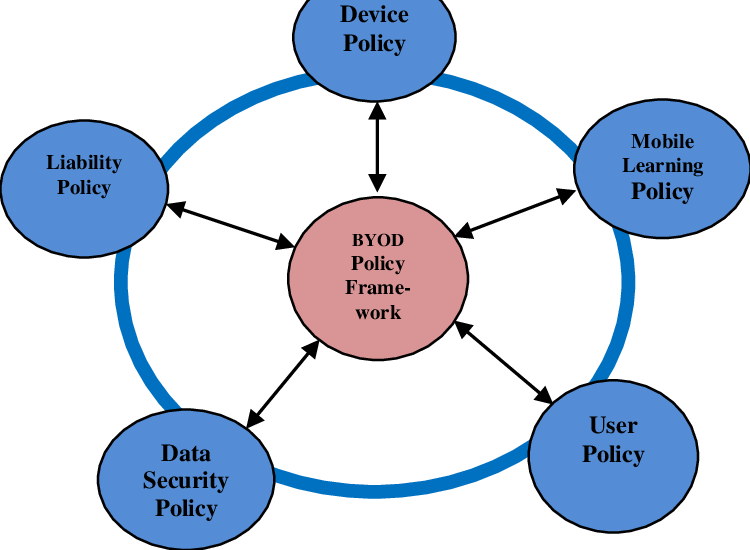
BYOD (Bring Your Own Device) security refers to the policies, technologies, and best practices organizations use to protect corporate data when employees use personal devices such as smartphones, tablets, or laptops for work. As workplaces become increasingly digital and remote-friendly, employees prefer using their own devices because they are familiar, convenient, and always available. While BYOD enhances productivity, flexibility, and cost-efficiency for organizations, it also introduces significant security risks that must be managed carefully. Without a strong BYOD security framework, businesses face data leakage, unauthorized access, malware outbreaks, and compliance violations.
One of the biggest challenges in BYOD environments is the lack of uniformity. Every employee has a different device model, operating system version, app environment, and security configuration. Some devices may be fully updated, while others may run outdated firmware with known vulnerabilities. This creates a fragmented and unpredictable security landscape. Attackers often exploit the weakest device in the network, and a single compromised phone can expose corporate emails, shared documents, VPN credentials, and internal communication channels. Organizations must therefore adopt strict policies that define which devices are allowed, what OS versions are required, and what security settings must be enabled before granting access.
Data separation is a core element of BYOD security. When employees use personal devices for work, it becomes essential to separate corporate data from personal files, apps, and accounts. Technologies such as containerization create isolated “work profiles” that store only organizational information and apps. This prevents personal applications from accessing business data and minimizes the risk of accidental leaks. If the employee leaves the company, IT teams can remotely wipe only the work container without affecting personal photos, contacts, or messages. This approach balances security with user comfort, preventing conflicts between personal privacy and corporate control.
Mobile Device Management (MDM) and Mobile Application Management (MAM) solutions form the foundation of BYOD security implementation. MDM tools enable IT administrators to enforce security policies, manage device settings, monitor activity, and remotely lock or wipe devices if needed. MAM tools focus specifically on controlling corporate apps, ensuring that sensitive data is encrypted, securely transmitted, and inaccessible to unauthorized apps. Together, MDM and MAM systems give organizations visibility and control over how data is handled on personal devices without excessively invading employee privacy.
Network security becomes even more important in BYOD environments, as employees may connect their personal devices to corporate networks through unsecured Wi-Fi, mobile hotspots, or public networks in cafés and airports. These connections are vulnerable to man-in-the-middle attacks, packet sniffing, or rogue access points. To address this, organizations use VPNs, secure access gateways, and network segmentation. Critical servers and databases are kept on isolated network segments, ensuring that compromised personal devices cannot easily access sensitive systems. Enforcing multi-factor authentication adds another layer of defense, preventing attackers who steal login credentials from entering corporate systems.
Application-level security is equally vital because personal devices often contain apps that can introduce risks, such as file-sharing tools, social media apps, or third-party messaging platforms. Some apps collect excessive permissions or have poor data security practices. Organizations create “approved app lists” for work-related tasks and block or restrict apps known to pose threats. Additionally, policies may require mandatory encryption, automatic OS updates, biometric authentication, and restrictions on screen-sharing or cloud syncing for work data. These app-level controls reduce the chances of accidental leaks or malicious exploitation.
Human behavior is one of the most unpredictable components of BYOD security. Employees may unintentionally install malicious apps, click phishing links, or share devices with family members, exposing corporate data. Regular cybersecurity training helps employees understand risks such as phishing, unsafe downloads, weak passwords, and the importance of reporting lost or stolen devices immediately. Awareness empowers employees to act responsibly, turning them from potential weaknesses into active contributors to security.
BYOD policies also involve legal and compliance considerations. Industries such as finance, healthcare, and government must follow strict regulations regarding data handling, auditing, and privacy. Organizations need clear policies that outline acceptable use, employee responsibilities, data monitoring boundaries, and remediation steps for security incidents. Transparent communication builds trust, ensuring employees know what the company can and cannot access on their personal devices. Effective policies reduce legal risks while ensuring compliance with standards such as GDPR, HIPAA, and ISO 27001.
As organizations continue to embrace digital transformation and remote work, BYOD security will remain a critical priority. Emerging solutions such as zero-trust architecture, biometric authentication, AI-based threat detection, and passwordless login systems are reshaping how BYOD environments operate. These technologies reduce reliance on device trust and focus instead on verifying user identity, context, and behavior. BYOD delivers significant benefits in flexibility and productivity, but only when supported by strong security architecture, employee awareness, and well-defined policies that protect corporate data without compromising user privacy.
One of the biggest challenges in BYOD environments is the lack of uniformity. Every employee has a different device model, operating system version, app environment, and security configuration. Some devices may be fully updated, while others may run outdated firmware with known vulnerabilities. This creates a fragmented and unpredictable security landscape. Attackers often exploit the weakest device in the network, and a single compromised phone can expose corporate emails, shared documents, VPN credentials, and internal communication channels. Organizations must therefore adopt strict policies that define which devices are allowed, what OS versions are required, and what security settings must be enabled before granting access.
Data separation is a core element of BYOD security. When employees use personal devices for work, it becomes essential to separate corporate data from personal files, apps, and accounts. Technologies such as containerization create isolated “work profiles” that store only organizational information and apps. This prevents personal applications from accessing business data and minimizes the risk of accidental leaks. If the employee leaves the company, IT teams can remotely wipe only the work container without affecting personal photos, contacts, or messages. This approach balances security with user comfort, preventing conflicts between personal privacy and corporate control.
Mobile Device Management (MDM) and Mobile Application Management (MAM) solutions form the foundation of BYOD security implementation. MDM tools enable IT administrators to enforce security policies, manage device settings, monitor activity, and remotely lock or wipe devices if needed. MAM tools focus specifically on controlling corporate apps, ensuring that sensitive data is encrypted, securely transmitted, and inaccessible to unauthorized apps. Together, MDM and MAM systems give organizations visibility and control over how data is handled on personal devices without excessively invading employee privacy.
Network security becomes even more important in BYOD environments, as employees may connect their personal devices to corporate networks through unsecured Wi-Fi, mobile hotspots, or public networks in cafés and airports. These connections are vulnerable to man-in-the-middle attacks, packet sniffing, or rogue access points. To address this, organizations use VPNs, secure access gateways, and network segmentation. Critical servers and databases are kept on isolated network segments, ensuring that compromised personal devices cannot easily access sensitive systems. Enforcing multi-factor authentication adds another layer of defense, preventing attackers who steal login credentials from entering corporate systems.
Application-level security is equally vital because personal devices often contain apps that can introduce risks, such as file-sharing tools, social media apps, or third-party messaging platforms. Some apps collect excessive permissions or have poor data security practices. Organizations create “approved app lists” for work-related tasks and block or restrict apps known to pose threats. Additionally, policies may require mandatory encryption, automatic OS updates, biometric authentication, and restrictions on screen-sharing or cloud syncing for work data. These app-level controls reduce the chances of accidental leaks or malicious exploitation.
Human behavior is one of the most unpredictable components of BYOD security. Employees may unintentionally install malicious apps, click phishing links, or share devices with family members, exposing corporate data. Regular cybersecurity training helps employees understand risks such as phishing, unsafe downloads, weak passwords, and the importance of reporting lost or stolen devices immediately. Awareness empowers employees to act responsibly, turning them from potential weaknesses into active contributors to security.
BYOD policies also involve legal and compliance considerations. Industries such as finance, healthcare, and government must follow strict regulations regarding data handling, auditing, and privacy. Organizations need clear policies that outline acceptable use, employee responsibilities, data monitoring boundaries, and remediation steps for security incidents. Transparent communication builds trust, ensuring employees know what the company can and cannot access on their personal devices. Effective policies reduce legal risks while ensuring compliance with standards such as GDPR, HIPAA, and ISO 27001.
As organizations continue to embrace digital transformation and remote work, BYOD security will remain a critical priority. Emerging solutions such as zero-trust architecture, biometric authentication, AI-based threat detection, and passwordless login systems are reshaping how BYOD environments operate. These technologies reduce reliance on device trust and focus instead on verifying user identity, context, and behavior. BYOD delivers significant benefits in flexibility and productivity, but only when supported by strong security architecture, employee awareness, and well-defined policies that protect corporate data without compromising user privacy.